
6. Multilingual video subtitles
Section outline
-
Videos are of course supported by Moodle, and when embedding videos, you can also provide multiple subtitle tracks in different languages. Visitors can then use the button to select a subtitle language:
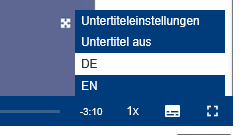
Language selection for video subtitles Here you can try switching between different subtitle tracks.
For this, the subtitles must be available in "Web Video Text Tracks Format" (WebVTT, file extension *.vtt). These can, for example, be created automatically using transcription tools and translated if needed. The format looks like this:
WEBVTT

00:00:21.000 --> 00:00:24.000
Hallo und herzlich willkommen zur Video-Anleitung

00:00:24.000 --> 00:00:26.000
Erste Schritte auf der Lernplattform,

00:00:26.000 --> 00:00:28.000
in der ich gerne ein Überblick über die Lernplattform

00:00:28.000 --> 00:00:31.000
der Technischen Hochschule Georg Agricola geben möchte.
As long as the timecodes—that is, the timestamps that determine when each subtitle snippet is shown—are not changed, creating another language version is fairly easy. The English counterpart of the German excerpt above would look like this:
WEBVTT

00:00:21.000 --> 00:00:24.000
Hello and welcome to the video tutorial

00:00:24.000 --> 00:00:26.000
"First Steps on the Learning Platform,"

00:00:26.000 --> 00:00:28.000
where I'd like to provide an overview of the

00:00:28.000 --> 00:00:31.000
learning platform of the Technical University Georg Agricola.
*.vtt files can easily be created in a text editor. If you already have a *.txt file, you can simply change the file extension from *.txt to *.vtt.
AI tools and language models can be very helpful both for transcription and for translation without changing the timecodes.